focus timer
I recently felt like I couldn't trust my own judgment anymore about how much time I put into things. I could sit on my desk for 8 hours, but did I really study that much? Work that much? Volunteer that much? Blog that much? What about my breaks (chatting, videos, toilet, kitchen)? Even if I felt like I did a lot that day, I wasn't sure how much already, since so much bled together.
I do not work in fixed increments (Pomodoro etc.) or set specific times when to start something. I just flow from one thing to another. I could summarize and translate a case, and then midway take a break to chat or watch a video, which then could inspire a blog post I'd write, and then I make some food, I have an idea for some pixel art and draw it, then after that I start studying, and when I need a break I continue the case again... it sounds a bit messier than it is in practice. It warps my perception though, especially because it all happens in the same location and on the same device.
So I needed a lightweight timer that would keep the time, let me label it, and then log it in a file. In the end, I could see how much I did of each thing in the file.
I asked for recommendations first, then couldn't really find what I was looking for otherwise, so I settled on AI-generating a solution for me. I couldn't add learning Python onto my busy schedule and waste it on a measly timer when I should be doing other things, and I needed it right that day, so I thought that's the perfect dirty work for an LLM for once.
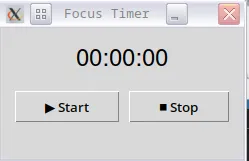
The timer has a 'Start' button that switches to 'Pause' once it is pressed, and 'Stop' opens a dialogue window to assign a label (= type in a word). After a label is assigned, it gets saved to a time_log.csv.
In the CSV file, it shows date, current local time, the given label, and the timer time. The way this is read depends on your locale and how you set the separator options. For me, it is set like this:
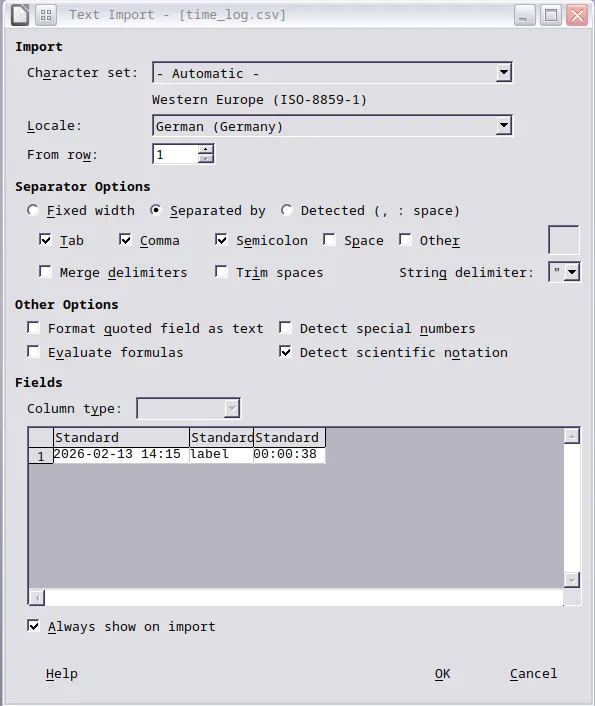
Different locale or separator detection can show the numbers in separate columns instead.
If anyone needs it, here is the AI-generated code with some manual edits by me (added symbols, adjusted how date and time is displayed in the CSV).
#!/usr/bin/env python3

import tkinter as tk
from tkinter import simpledialog
import time
import os
import threading
import pystray
from PIL import Image, ImageDraw

class FocusTimer:
    def __init__(self, root):
        self.root = root
        self.root.title("Focus Timer")
        self.root.geometry("240x130")
        self.root.attributes("-topmost", True)
        self.root.resizable(False, False)

        # move window bottom-right
        self.root.update_idletasks()
        w = self.root.winfo_width()
        h = self.root.winfo_height()
        x = self.root.winfo_screenwidth() - w - 20
        y = self.root.winfo_screenheight() - h - 60
        self.root.geometry(f"+{x}+{y}")

        self.running = False
        self.start_time = 0
        self.elapsed = 0

        self.label = tk.Label(root, text="00:00:00", font=("Helvetica", 18))
        self.label.pack(pady=(18, 10))

        btn_frame = tk.Frame(root)
        btn_frame.pack(fill="x", padx=8, pady=5)

        self.toggle_btn = tk.Button(
            btn_frame,
            text="▶ Start",
            command=self.toggle_timer
        )
        self.toggle_btn.pack(side="left", fill="x", expand=True, padx=4)

        self.stop_btn = tk.Button(
            btn_frame,
            text="⏹ Stop",
            command=self.stop
        )
        self.stop_btn.pack(side="left", fill="x", expand=True, padx=4)

        self.root.protocol("WM_DELETE_WINDOW", self.hide_window)

        self.update_timer()
        self.setup_tray()

    # --- TIMER LOGIC ---

    def toggle_timer(self):
        if not self.running:
            self.running = True
            self.start_time = time.time()
            self.toggle_btn.config(text="⏸ Pause")
        else:
            self.elapsed += time.time() - self.start_time
            self.running = False
            self.toggle_btn.config(text="▶ Start")

    def stop(self):
        if self.running:
            self.elapsed += time.time() - self.start_time
            self.running = False

        if self.elapsed > 0:
            label = simpledialog.askstring("Label", "What were you working on?")
            if label:
                self.save_session(label)

        self.elapsed = 0
        self.label.config(text="00:00:00")
        self.toggle_btn.config(text="▶ Start")

    def update_timer(self):
        total = self.elapsed
        if self.running:
            total += time.time() - self.start_time

        hrs = int(total // 3600)
        mins = int((total % 3600) // 60)
        secs = int(total % 60)

        self.label.config(text=f"{hrs:02}:{mins:02}:{secs:02}")
        self.root.after(500, self.update_timer)

    # --- SAVE LOG ---

    def save_session(self, label):
        total = self.elapsed
        hrs = int(total // 3600)
        mins = int((total % 3600) // 60)
        secs = int(total % 60)

        formatted_time = f"{hrs:02}:{mins:02}:{secs:02}"

        log_file = os.path.join(os.path.dirname(__file__), "time_log.csv")

        with open(log_file, "a") as f:
            f.write(
                f"{time.strftime('%Y-%m-%d %H:%M')},"
                f"{label},"
                f"{formatted_time}\n"
            )

    # --- TRAY ICON ---

    def setup_tray(self):
        image = Image.new("RGB", (64, 64), "white")
        draw = ImageDraw.Draw(image)
        draw.ellipse((16, 16, 48, 48), fill="black")

        menu = pystray.Menu(
            pystray.MenuItem("Show", self.show_window),
            pystray.MenuItem("Quit", self.quit_app)
        )

        self.tray_icon = pystray.Icon("FocusTimer", image, "Focus Timer", menu)

        threading.Thread(target=self.tray_icon.run, daemon=True).start()

    def hide_window(self):
        self.root.withdraw()

    def show_window(self, icon=None, item=None):
        self.root.deiconify()

    def quit_app(self, icon=None, item=None):
        self.tray_icon.stop()
        self.root.destroy()


if __name__ == "__main__":
    root = tk.Tk()
    FocusTimer(root)
    root.mainloop()
Probably silly as hell code, but what do I know.
Put it into a file called focus_timer.py and allow it to run as executable.
Reply via email
Published